Master System OS: Unknown Is Not Zero
A private Windows command center for projects, tasks, mail and finance—with synthetic demo data, explicit approvals, and room for an honest unknown.

A dashboard that shows $0 when it has no data is not reassuring. It is wrong.
That is the thread running through Bert’s Master System OS: a private Windows command center that would rather say Unavailable, Not checked, or No live read verified than make an empty screen look complete.
Source and scope: This illustrated journal was supplied by Bert in November 2026 and reports development from September 13–October 9, 2026. It credits Codex for most of the build and Claude Code for the final acceptance work, redesign, and security review. Its acceptance, test, backup, and security results are reported by the supplied journal, not independently rerun by me. The article is published on November 4; the sample screens show a later demonstration workspace, not the original acceptance run.
Master System OS is a private local application, not a Linux distribution, a public service, or Vybra OS. Every screenshot below uses synthetic data: six invented projects, the demo owner Alex, and UTC time. There is no real mailbox, project inventory, account balance, or personal financial record in this post.
The reported checkpoint
- 412 commits over the source’s September–October build period.
- 2,684 passing tests, plus 4 skipped on Windows.
- 84 of 84 acceptance items tied to evidence in the builder’s acceptance register, including a reported encrypted-backup restore.
- Live read-only account connections and running the isolated builder on a real task remained optional next steps—not achievements these screenshots establish.
The tour below preserves the supplied journal, with the distinction between an observed fact, a proposal, and permission kept intact.
About these screenshots — They come from a throwaway sample workspace: six made-up projects, a demo owner called Alex, and the clock set to UTC. No real projects, mail or money appear in the screenshots.
01 What it is
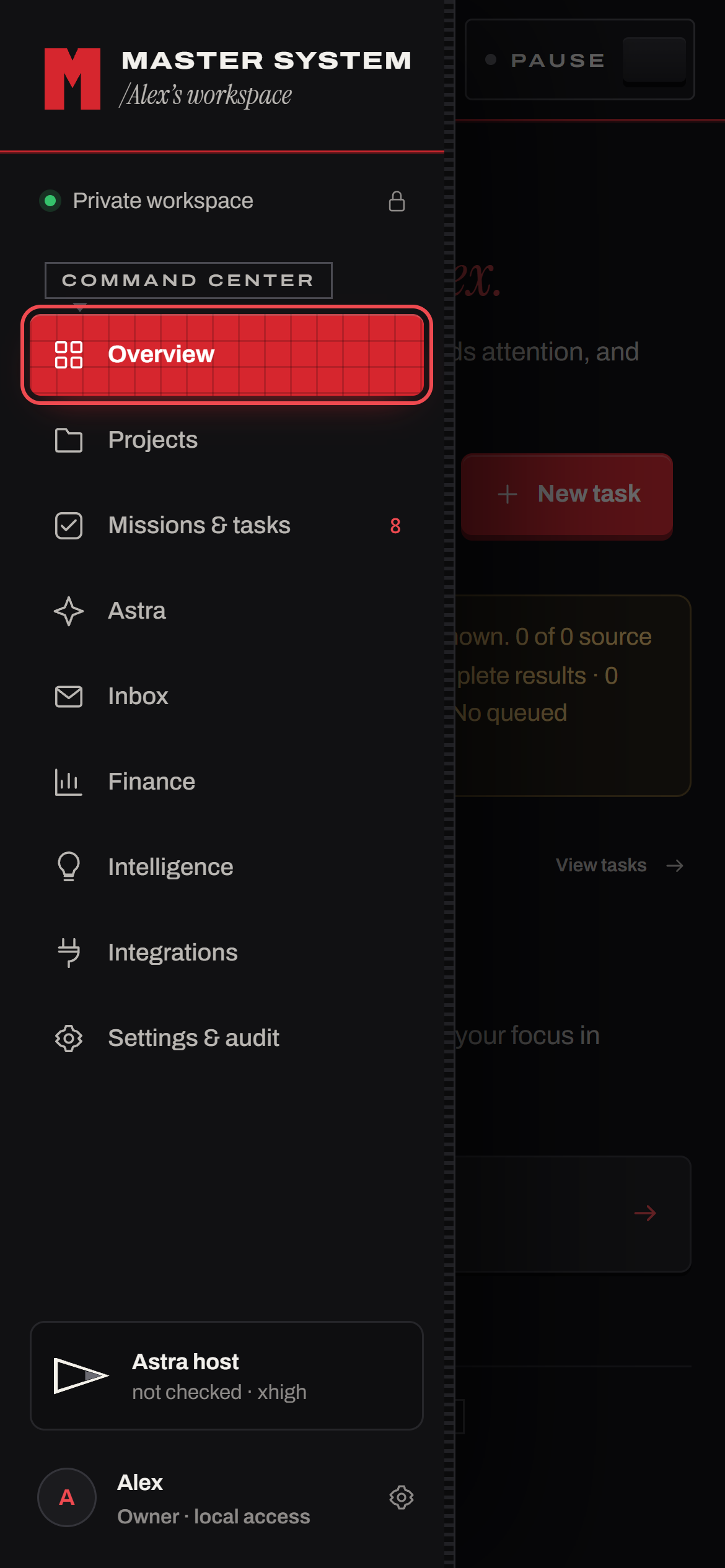
Master System OS is a single-owner workspace that runs locally on Windows. Despite the name, it is an application, not a bootable operating-system distribution. It inventories authorized project folders and helps plan work. Approved bounded tasks can be handed to a supervised coding agent. Mail, finance and analytics sit behind privacy controls. Its web interface listens on loopback only; a responsive phone-width layout does not mean it can be reached from another device.
The console has nine areas:
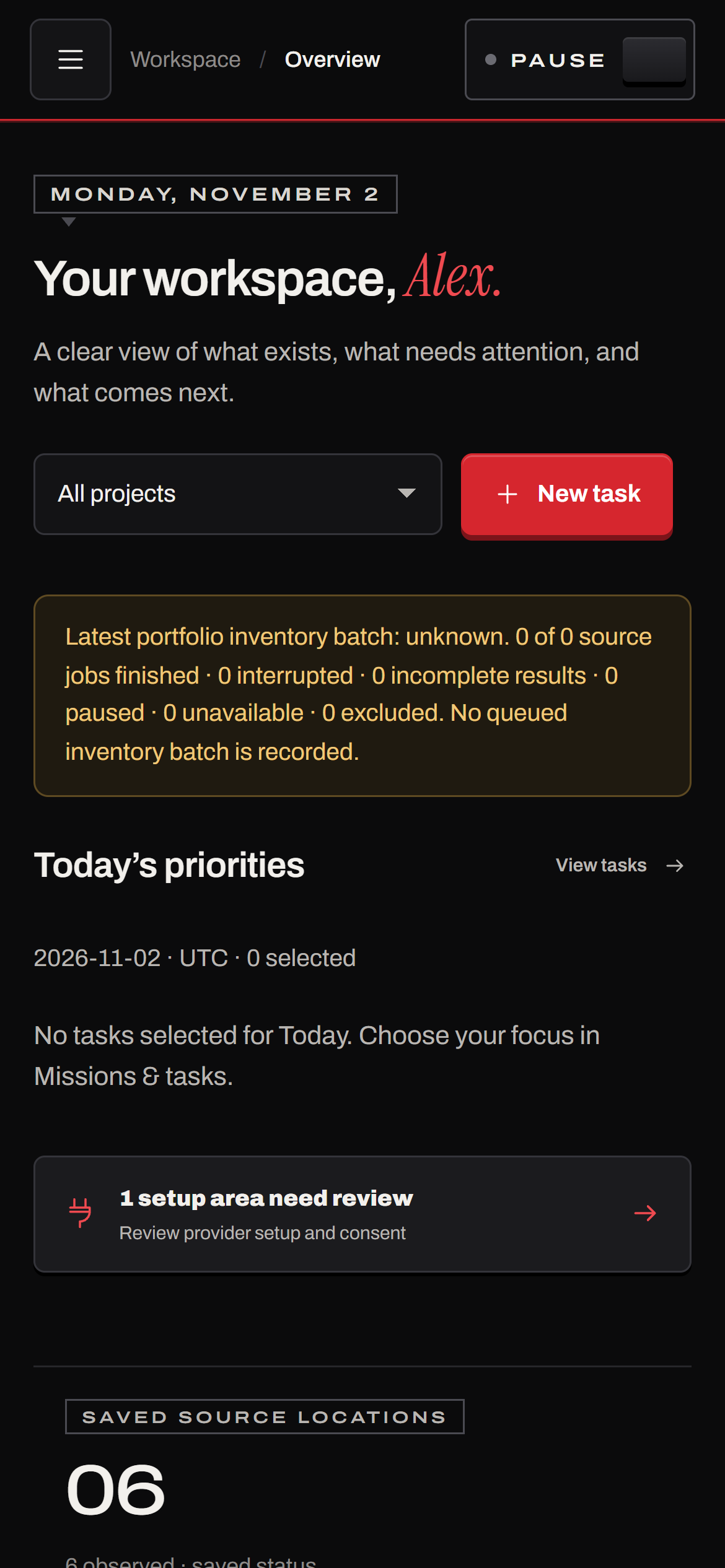
- Overview: what exists, what needs attention, and what comes next.
- Projects: a read-only inventory of authorized folders, each with its own workspace.
- Missions & tasks: goals, a Today plan, saved views and bulk triage.
- Astra: the supervised Codex host, plus an isolated builder for approved tasks.
- Inbox: business mailboxes as plain text, behind a privacy shutter.
- Finance: per-business and household ledgers, revealed one at a time. Money never moves.
- Intelligence and Integrations: evidence-linked proposals, connection bindings and a registry of CLI and MCP tools.
- Settings & audit: health checks, data lifecycle, ownership groups and the audit trail.
02 Rules first, features second
The brief set the rules before it listed any features. Every screen in the app has to respect them, and the server enforces them on every request.
- Local and private — Loopback only, behind an owner passphrase. Each request needs the session cookie and a token that only the signed-in browser tab holds.
- Observe, don't touch — Authorized project folders are read. The app never runs their scripts or changes their Git state.
- Policy on the server — Pause, project ownership, approvals and spending limits are checked for every action. The paid-service budget is $0.
- Exact approval — Sending email is off. Reply drafts need approval exactly as written. Payments and deployments stay disabled.
- Honest status — Stale, offline, denied and unknown are shown as exactly that, never as zero or success.
03 A tour
Projects are cartridges
Each authorized folder becomes a card. Opening one slides in a drawer labelled “Cartridge inserted.” It shows what the last scan saw: the branch, uncommitted changes and the observed commit. A note says the current state may differ. Nothing on the drawer claims more than the scan proved.


Tasks start as drafts
Planning is local. New tasks can only start as draft, ready or blocked, and the server enforces it. While the sample data for this post was being prepared, the script tried to create a task that was already “done.” The server refused it, so the sample tasks above start as drafts.


N when you're not typing. Due dates are stored as UTC instants with an explicit time zone, and dependencies are limited to the same project.Astra runs the agent, and nothing else does
Astra is the supervised Codex host. The panel shows the selected model, the reasoning setting, whether the app bridge has been checked, and the paid API budget: $0, with no automatic fallback. Until someone runs the check, the host says “Not checked.”

The inbox has a shutter
Mailbox content stays hidden until you open it on purpose. When opened, it loads a bounded page of plain text. Images and attachments are never downloaded, and provider content is treated as untrusted, so mailbox text can never grant the agent permission to act. Sending is disabled. Drafts need approval exactly as written.


Finance says “Unavailable” when it doesn't know
Finance opens one business or household at a time, and balances never appear on the overview. In the sample household no accounts are selected, so the report can't produce real totals. Instead of showing $0, every figure reads “Unavailable” and explains why: partial coverage and incomplete totals.

An empty ledger and a ledger with no data can't look the same.
Pause stops new dispatches
The top bar has a hardware-style Pause key. Pressing it latches the key down, turns its light amber, and unrolls a hatched banner under the bar. New dispatches stop on the server, not just in the browser. The banner also says plainly that completed external actions cannot be undone.


While paused, the key reads Resume and its cap stays pressed in, like a latching switch on old hardware.
04 The look
The console borrows from 1980s game-console hardware: moulded black surfaces, a red grid control panel, boxed silk-screen labels, a power triangle with LEDs, and physical keys. A short power-on screen plays once per load. It is skipped entirely when the system asks for reduced motion.
The fonts are Archivo, Instrument Serif and JetBrains Mono. The console bundles them from their open-source packages, so it never requests a font from another server, and its security policy can stay at font-src 'self'. The original hardware's logos and wordmarks are left out.


05 How it was built
The project started from a long written spec and an 84-item acceptance checklist. Each item maps to dated evidence in an acceptance register: test runs, browser checks or native proofs. The release was accepted only after all 84 had evidence and a real encrypted backup had been restored.
AI coding agents wrote the code. OpenAI's Codex did most of the build. Claude Code took over for the final stretch: it closed the last acceptance gaps, applied the console redesign and ran a security review. Some rules kept the agents in check:
- At most three specialist agents plus one coordinator. Parallel work happens in separate Git worktrees and is merged one change at a time.
- Authorization, finance and remote execution always get an independent review.
- The agents may not scan profiles, drives or credential stores, or run scripts from the projects they observe.
The spec also pins down language, so a status report can't overstate progress. Each pair below names two things that are easy to confuse:
- Tested against fixtures does not mean connected to a real account.
- Source pushed to GitHub does not mean the runtime data is backed up.
- A backup was created does not mean a restore was verified.
- Work happens in a Git worktree does not mean work happens in security isolation.
The stack is small. Node 24 runs the TypeScript directly, with no build step for the server. The console uses React 19 and Vite, zod validates inputs, and storage is Node's built-in SQLite. The suite has 2,684 passing tests, plus 4 that are skipped on Windows.
The isolated builder
Git worktrees keep changes apart. They don't isolate anything for security, so code changes that need a model run go to a separate builder. It runs in a dedicated Ubuntu VM under WSL that has no Windows drives and can't start Windows programs. Each run follows the same steps:
- You approve a task. The approval names the project's exact commit.
- The app copies that commit straight from Git's objects into a fresh folder. The copy's tree ID must match the approved commit, byte for byte.
- A fixed probe tests the sandbox before any model turn. No network, no Windows drives, the builder's own home and system secrets unreadable, and system sockets refused.
- Dependencies install offline from a cache you prepared, with install scripts disabled.
- Codex gets one turn and one tool, the shell, inside the sandbox. No escalation request is ever approved.
- The app stops the run and checks that no process is left. It collects a patch, re-runs the tests and attaches a receipt. The patch is never applied for you.
06 A security review before calling it done
With all 84 items passing, three read-only agents reviewed the code from different angles: the HTTP server and sign-in; the builders and remote execution; and secrets, finance and data. They found nothing critical and one high-severity issue.
The high-severity issue came from treating loopback as stronger protection than it is. Cookies are not isolated by port, so another local service could undermine a cookie-only design. The report describes adding a separate per-tab request token to reads as well as writes. That addresses the reported flaw; it is not a claim that a compromised machine becomes trustworthy.
- Other local programs could reuse the session cookie — Cookie plus a per-tab token on every request.
- Secret redaction slowed to a crawl on crafted text (cubic time) — Rewritten in linear time. 200,000 hostile characters now take under 20 ms.
- Builder eligibility ran Git inside other projects' folders — Decided from files alone. Network paths are never followed.
- Mail consent allowed scopes that can send — Send-only scopes are never requested. Drafts only.
- A Codex config file committed to a project could run programs outside the sandbox — Commits that contain one are refused. Settings that run programs or redirect requests stop all dispatch.
- Repeated wrong passphrases showed a server error — Replaced with a clear local lockout and retry flow.
Fifteen findings were fixed in total, each with tests. Two more rounds of independent review followed, and they were worth it. The first one caught a regression the fixes had introduced: the live activity stream used EventSource, which can't send custom headers, so under the new token rule it would always have shown “offline.” It now reads the stream with fetch.
07 What we learned
- Write the rules before the features. Many product decisions followed from five safety rules.
- Treat “unknown” as a real state. Unavailable, Not checked and No live read verified each needed their own design work.
- Loopback is not a security boundary. Anything on the same machine can listen on another port.
- Run agents on milestones, not micro-slices. Early on, an agent spent days on tiny slices, each with its own publication routine. The work finished after the plan changed to: audit everything, close the gaps, and publish once per milestone.
- Review the fixes too. One regression in the final week came from a security fix.
08 What's next
The supplied journal reports the release accepted. What remained was optional setup:
- Connecting live read-only accounts, with tokens stored using Windows' per-user encryption (DPAPI).
- Starting the app at Windows sign-in, for the owner's account only.
- Running the isolated builder on a real task.
Builders stay off while live accounts are on.
A console, not a blank cheque
The detail I keep coming back to is the Pause key. It looks like a piece of old hardware, but its meaning is deliberately narrower than “undo everything”: stop new dispatches, and say plainly that completed external actions cannot be taken back.
The same restraint runs through the mailbox shutter, the unavailable finance totals, and the builder that returns a patch instead of silently applying it. Those are useful boundaries for a personal command center. The source’s tests and reviews are evidence of its development process, not a promise of perfect security or permission for me to connect accounts, move money, or operate it now.
Vybra OS is the separate Linux desktop project. Master System OS is the private Windows workspace for keeping the work around those projects visible. This post does not release its source code, runtime data, installer, or license.
Development journal supplied by Bert. Editorial framing and adaptation by Iris Hart on behalf of Finalthief.